Most aspirants prepare for the syllabus for months and meet the exam interface for the first time on exam day. For a computer-based test (CBT) like JEE Main, that's a real, avoidable risk. The first ten minutes go on figuring out what the colours mean, how "Save & Next" differs from "Mark for Review", and whether switching subjects loses your answers.
The question palette, decoded
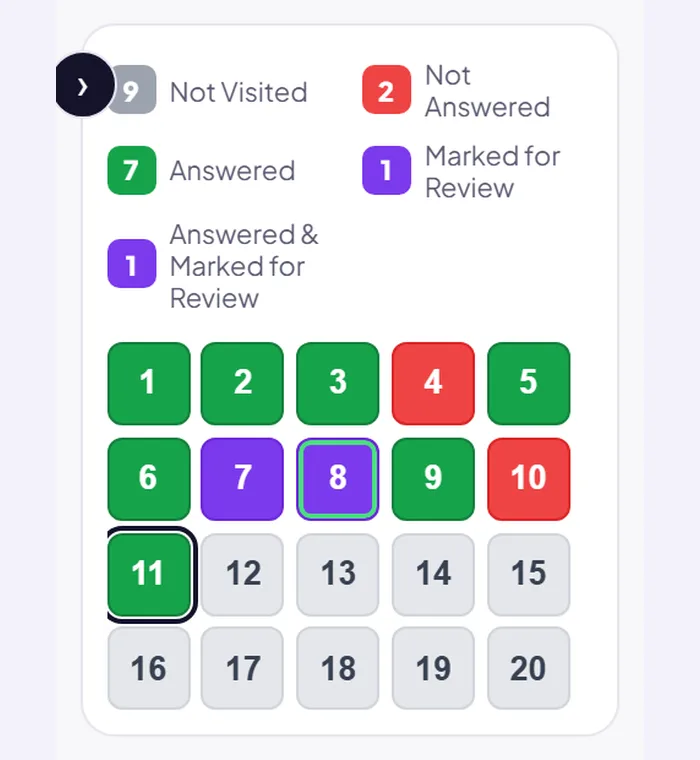
The grid of numbered boxes on the side of the screen is your map of the whole paper. Each question is always in one of five states:
- Not Visited: you haven't opened it yet.
- Not Answered: you opened it but haven't saved an answer.
- Answered: you've selected and saved an answer.
- Marked for Review: no answer saved, but flagged to come back to.
- Answered & Marked for Review: an answer is saved and flagged. Check your exam's instructions on how these are evaluated; in the NTA's pattern, a saved answer is counted.
The habits that save time
- Always save. Selecting an option is not the same as saving it. Get into the habit of "Save & Next" until it's automatic.
- Use Marked for Review deliberately. Only for questions you genuinely plan to return to, not as a vague "unsure" stamp on half the paper.
- Glance at the palette every 20–30 minutes. It's the fastest way to see how many you've attempted and how many you've parked.
- Know how to switch sections before the day. You shouldn't be discovering the subject tabs mid-exam.
- Leave five minutes at the end just for the palette: revisit anything marked, and make sure nothing you meant to answer is sitting unsaved.
Reading on a screen is different
Long physics or chemistry questions read differently on a monitor than on paper. You can't underline, and scrolling breaks your flow. Practise working with rough paper beside the screen: note key values as you read, rather than re-reading the whole question three times.
Practise on a realistic screen
Sanviora's entrance exam mock tests run on an exam screen modelled closely on the real CBT layout: candidate info bar, subject tabs, the five-state question palette, mark-for-review, and a live countdown timer, with a general-instructions page before you begin. (It's our own practice interface, not affiliated with the NTA.) A few full papers on it and the interface stops being something you think about, which is the goal. For a full walkthrough, see our CBT exam practice guide.